Nothing beats seeing your video take off. But that kind of momentum usually starts with one thing – getting people to watch your videos for longer. Because when you increase your content’s audience retention, YouTube’s algorithm is far more likely to recommend it to new viewers. It’s one of the best ways to help your channel grow faster.
Consider the YouTubers you watch most and you’ll find their videos naturally draw you in longer than most. There’s nothing to stop your content doing the same with a few tactical tweaks.
In this guide we’ll break down what audience retention can tell you about your uploads. You’ll learn what audience retention rate you should be aiming for, and how you can make changes to your next upload that’ll have viewers sticking around.
- What is audience retention on YouTube?
- Where to find audience retention in YouTube Studio
- How to read YouTube's audience retention graph
- What is good audience retention on YouTube?
- 11 tips to improve your audience retention

What is audience retention on YouTube?
Audience retention is a metric that shows how much of your video viewers are actually watching. It tracks the percentage of your audience that sticks around at each point in the video – from the very beginning to the very end.
A strong retention rate shows YouTube that your video delivers value, keeps viewers interested, and is worth recommending to more people. Ultimately, if your video performs well against other videos that an audience might be interested in, YouTube’s algorithm will rank it higher and show your content to more people.
While audience retention shows the percentage of a video watched, you may also come across average view duration, which tells you the total time viewers spend watching. The two metrics are closely linked, but audience retention gives a clearer picture of how your content holds attention throughout.
Where to find your audience retention in YouTube Studio
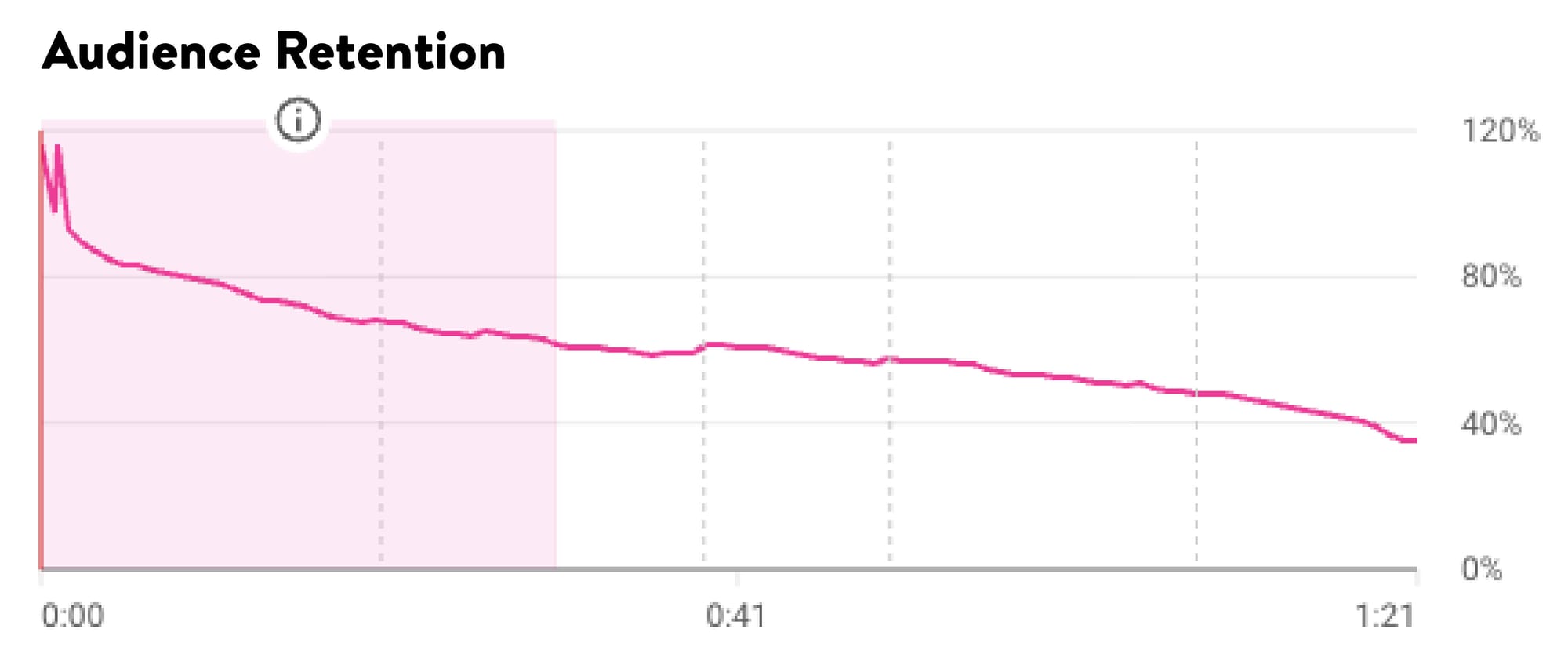
YouTube Studio’s audience retention graph (see the example below) shows how viewers respond to your video over time – including where they drop off, rewatch, or skip ahead:
- Go to YouTube Studio
- Click on ‘Content’ in the left-hand menu
- Choose the video you want to analyse
- Click into the ‘Analytics’ tab
- Select ‘Engagement’ from the top navigation
- Scroll down to see the Audience Retention graph
How to read your audience retention graph
Your audience retention chart gives a real-time view of how people are responding to different parts of your video. Spotting these patterns helps you understand what’s working, what’s losing attention, and where to focus your edits to improve retention.
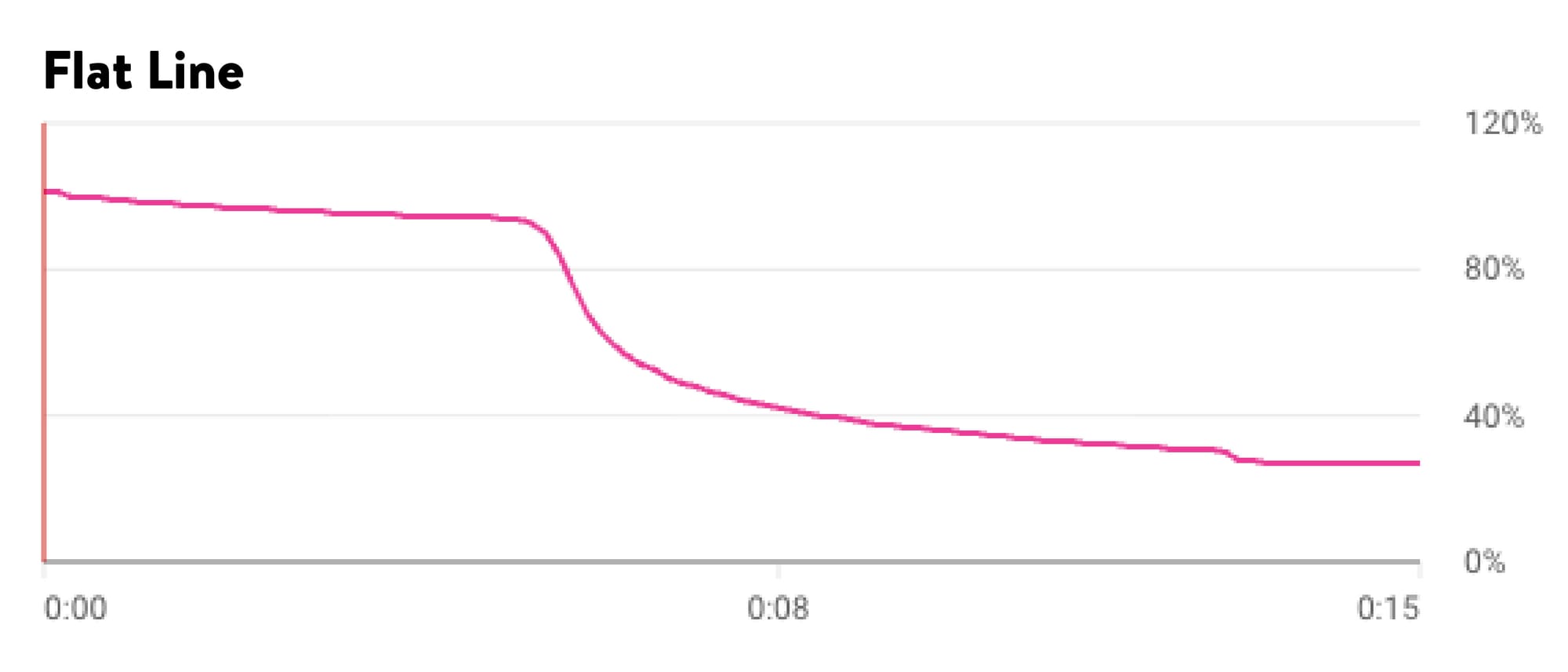
A flat line shows that viewers are staying engaged and watching that section from start to finish.
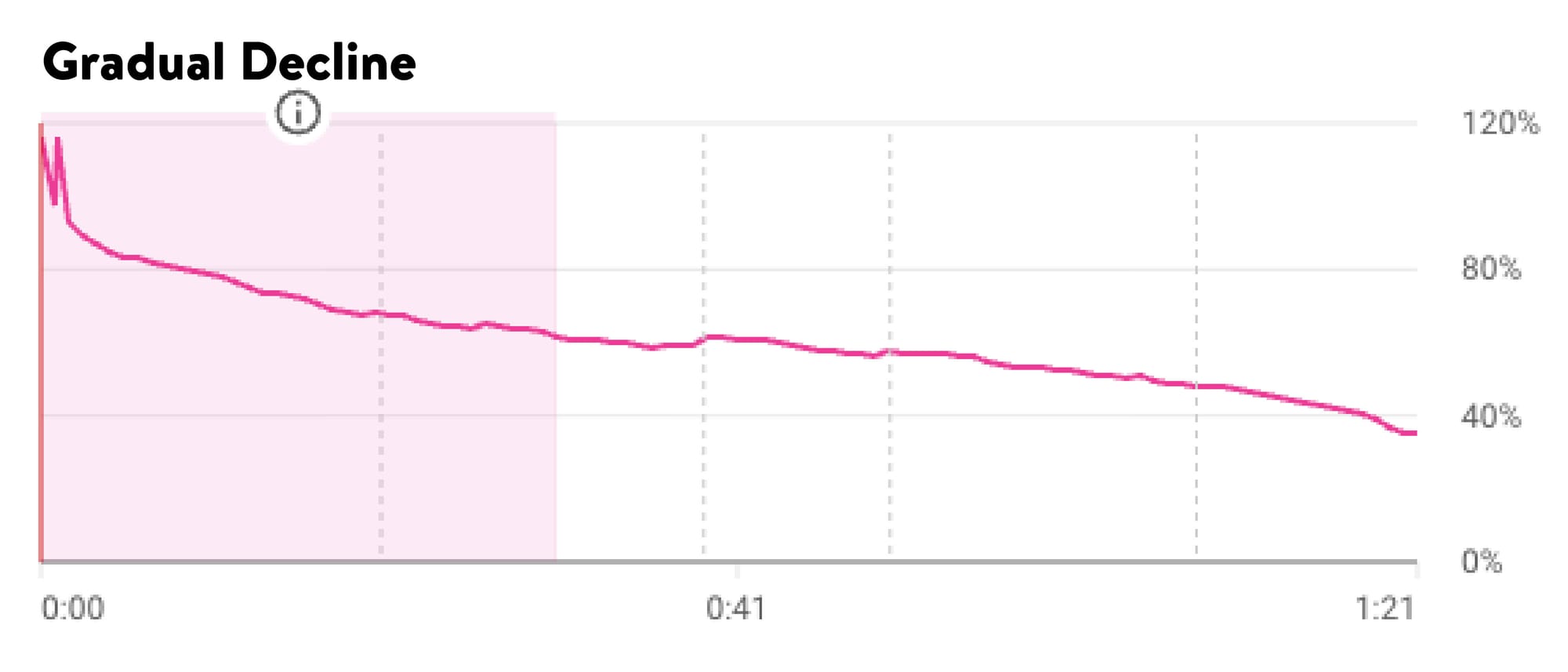
A gradual decline means attention is slowly dropping off over time – usually a sign that pacing or content needs tightening.
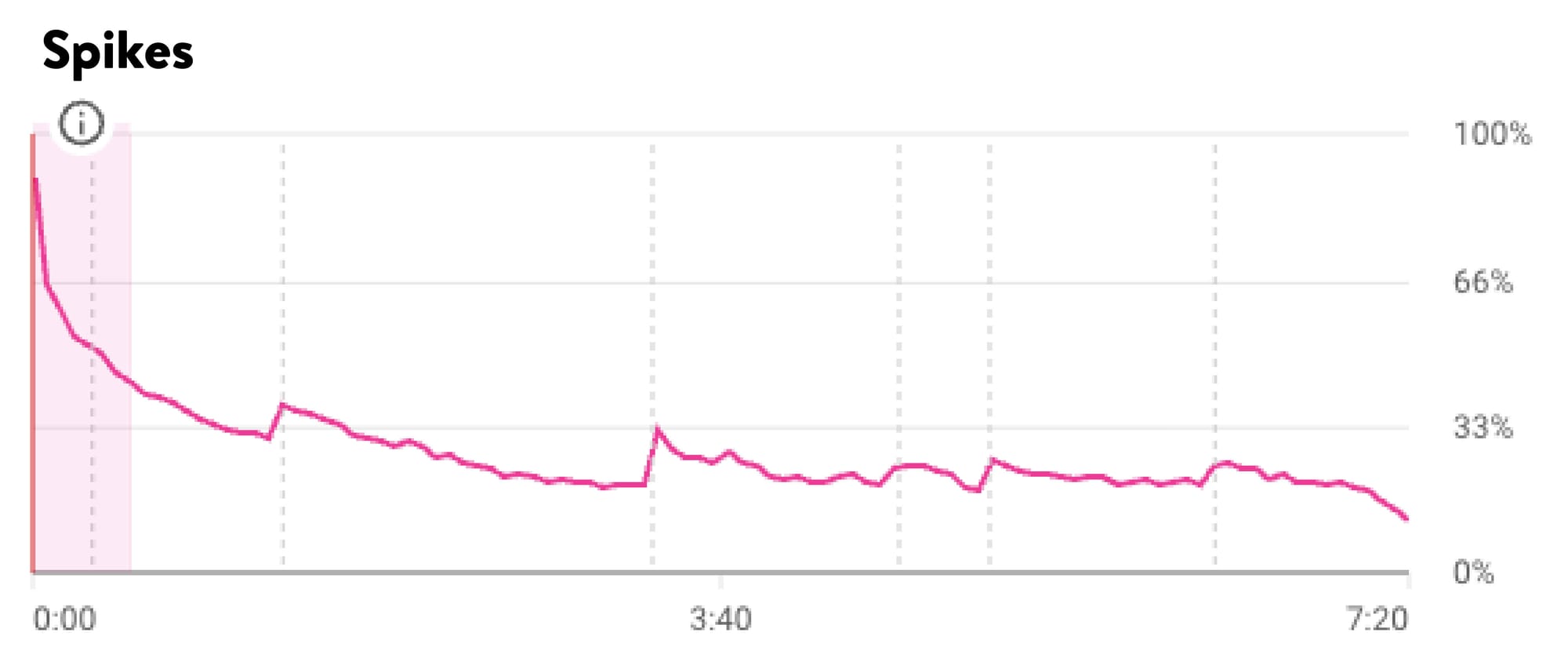
Spikes often appear when a moment gets replayed or shared, while dips signal that viewers are skipping ahead or leaving altogether.
Don't stop at the retention graph alone – your Returning Viewer rate, found in the Audience tab, tells an important part of the story too. According to YouTube, a drop in that rate is often a sign "you're no longer serving the specific need that drove initial retention." In other words, your audience came back once because something resonated. If they're not coming back again, the content has drifted from what earned their trust in the first place.
What’s considered good audience retention on YouTube?
There’s no single number that counts as “good” when it comes to audience retention. It depends on factors like your video length, your niche, and the kind of viewers you want to reach. But here are the benchmarks creators have shared for YouTube in 2025 – and what to aim for.
The overall average?
Most videos only retain about 24% of viewers by the end and more than half of people tend to drop off within the first minute. That means keeping attention is a real challenge across the board.
Short videos (under 2 minutes):
If you’re holding 70%+ of your viewers in the first 30 seconds, you’re in a strong position. That kind of retention is a key sign your video could get picked up by the algorithm – especially with high-energy hooks or fast-moving formats like YouTube Shorts.
Mid-length videos (5–10 minutes):
This is where retention starts to drop off. Around 40–50% is a solid benchmark, while 50–60% is rare but possible if your content hits just right. If you’re consistently landing around 45%, you’re doing well.
Longer videos (10+ minutes):
For long-form content, 35–50% retention is considered strong. You’re more likely to see this with educational or tutorial-style videos where viewers are invested in taking in the full video.
Your retention also depends on who your viewers are. An audience watching a recipe, for example, will usually stick around longer – and might even rewatch sections. But if you’re making lifestyle, vlog, or entertainment content, you’ll need to work harder to hold attention.
The key isn’t chasing a magic number – it’s spotting the points where people stop watching and finding ways to tighten up your pacing, structure, or delivery. That’s especially true in the first 30 seconds and around any mid-video lulls where viewers are most likely to click away.

11 practical tips to increase audience retention
You don’t have to overhaul your content to improve audience retention. A sharper focus on how each part of your video holds attention is all you need to make a big difference. These 11 practical tips will help you keep more viewers watching all the way through:
- Skip the long intros to hook viewers from the start
Most viewers decide whether to stick around within the first few seconds of your video. A long-winded intro gives them more time to click away. Instead, lead with something visual, intriguing, or straight to the point – and hold back on logos, channel intros, or context that can wait. When your video opens with momentum, you’re more likely to carry that attention forward.
- Tease what’s coming up to give people a reason to watch
Explain the value viewers will get from watching your video and you’ll give them a reason to stay. A simple line that hints at what’s ahead creates anticipation without spoiling the payoff. Use this technique early to encourage viewers to watch through to the end.
- Keep your pacing tight to avoid losing attention
A slow or uneven rhythm can break a viewer’s focus. When scenes linger too long or dialogue drags, drop-offs start to appear. Trim pauses, remove filler, and move from one section to the next with purpose. B-roll, cutaways, and subtle transitions can keep the pace feeling clean without making the edit feel rushed.
- Use visual changes to keep your content feeling fresh
Switch up your visuals at different points throughout your video to help reset attention. You don’t need flashy effects, just enough variety to stop the viewer from tuning out. Try cutting between camera angles, overlaying graphics, or using simple motion elements. These changes work especially well in talking-head or tutorial formats where static shots dominate.
- Show your point on screen instead of only explaining it
When you can demonstrate something visually, do it. If you’re reviewing gear, show it in action. If you’re giving advice, display it as on-screen text while you speak. Visual reinforcement not only keeps things interesting, it also helps viewers understand and remember what you’re saying.
- Use music and sound design to guide the viewer’s focus
Audio plays a subtle but crucial role in keeping people engaged. Music can shape the pace and feel of your video, while sound effects draw attention to transitions or key points. Even quiet background tracks can make your edit feel more polished.
Callout card - Want to find quality audio that’s safe to use in your edits? Platforms like Uppbeat offer professional-standard copyright-free music and sound effects you can simply drop into your timeline.
- Emphasize key points with subtle on-screen elements
Direct your audience’s attention exactly where you want it. Visual cues like a simple pop-up, underline, or motion graphic can reinforce what you’re saying and help break up long sections of dialogue. You don’t need to overuse them – a few well-placed touches can make your video feel sharper and more intentional.
- Deliver a clear payoff and point your viewer to what’s next
Strong endings matter just as much as strong openings. Instead of tapering off, close your video with a clear payoff. For example, you could show the final result, share an interesting takeaway, or answer a problem you teased at the start. From there you can lead into your next video or playlist to keep people on your channel.
- Use your retention graph to find what needs fixing
YouTube’s audience retention graph shows exactly where people start to lose interest. Look for common drop-off points or sections where attention dips. These patterns highlight what’s working and what needs tightening. Even a small improvement in one section can lift your overall retention.
- Build a repeatable structure to help viewers stay engaged
When people know what to expect, they’re more likely to stick with you. A clear structure – intro, main content, wrap-up – gives your videos a rhythm that regular viewers can follow. You don’t need to make every video identical, but a consistent format builds familiarity and helps keep attention throughout.
- Keep reinforcing the value of watching to reduce drop-offs
When you remind your audience what they’ll gain from watching, you help re-engage them mid-video. You don’t need to repeat your hook, just give gentle reminders of what’s coming next. These moments signal that there’s more to come and keep curiosity high.

Check your audience retention part of your creative process
Strong audience retention doesn’t come from luck, it comes from understanding what keeps people watching and applying it to every video you make. Over time, these simple additions and tweaks will help your content hook people for longer – and give your channel a better chance of growing steadily as a result!
You don’t need a full re-edit to boost audience retention. Just using visuals and audio more intentionally can help hold people’s attention better. If you’re looking for high-quality assets you can drop straight into your edits, Uppbeat has a full library of copyright-safe music, sound effects and motion graphics that are ready to use in your content.