YouTube is making it easier for viewers to spot AI-generated content and in some cases, it’s doing the spotting itself. The platform is redesigning its AI labels to be clearer and more readable for your viewers. It’s also started to apply these labels automatically when it detects generative AI in a video, rather than relying solely on you to disclose your own AI content.
Creators have had full control over how their content is labeled until now. If YouTube flags your video, a label stating “Made with AI” may appear whether or not you’ve said anything. The practical question is how to get ahead of it and the good news is that doing so is straightforward once you know what to look for. Below we cover what’s changed and the steps worth taking now.

What’s changed?
The easier AI makes it to generate content, the more important it becomes for viewers to know what they're watching. YouTube has updated how it labels AI-generated content in two ways. The first is visual – the labels are being redesigned to be clearer and easier for viewers to understand at a glance.
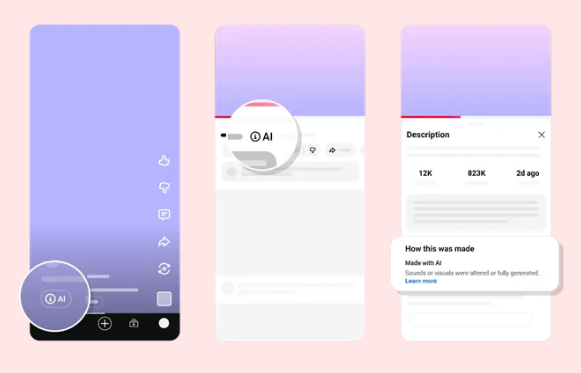
The second significant change is that YouTube is now beginning to apply AI labels automatically, using its own detection systems to identify generative AI in videos and not just flagging them when creators tick a box at upload. This is still rolling out, but YouTube says it will expand over time.
The shift to flagging AI content is happening at an industry level too. At Google I/O 2026, Sundar Pichai confirmed that ElevenLabs – one of the most widely-used AI voice tools among creators – is now adopting SynthID, Google’s invisible watermarking system for AI-generated content. OpenAI and other AI platforms are doing the same.
SynthID has already watermarked over 100 billion images and videos and 60,000 years of audio across Google’s own products. As these watermarks become embedded in the tools creators use every day, platforms like YouTube will have more reliable ways to detect AI-generated content automatically, even when it isn’t disclosed.
If you use AI voiceover in your videos, that last point is particularly relevant. ElevenLabs audio could soon carry invisible markers that YouTube’s detection can read. That makes getting ahead of the labeling conversation now – on your terms – more important than waiting for a label to appear without context. We cover the practical steps for how to do that below.

Why this matters for creators
The immediate impact is about how viewers perceive your content. An AI label that appears unexpectedly can raise questions about how much of what they’re watching is really you. That doesn’t mean labels are bad – YouTube isn’t framing this as a penalty, and a label won’t push your video down in recommendations. But a label that appears without any context from you can feel like a surprise, and surprises can quietly affect your audience’s trust.
Until now, you could choose whether and how to disclose AI involvement, framing it as a tool you used deliberately rather than a defining feature of the video. Automatic labeling changes that. If YouTube flags your content before you've said anything, the label does the framing for you, and that context gap is what can change how viewers feel about what they're watching.
The right mindset is to treat AI as something you use openly rather than something you keep quiet about. VFX YouTuber Ignace Aleya put it well in a previous Uppbeat interview: "AI is just another tool creators can use. We have to try it and learn how to work with it because it's here to stay and it's only going to get better."
Creators who already approach AI with intention, and without hiding it are the ones best placed to get ahead of this, because their disclosure feels like part of their process rather than a reaction to a label.

Uppbeat’s take: Label your AI content on your terms before YouTube does it for you
This update is more opportunity than risk if you move first. A label that appears alongside your own clear framing feels very different to one that appears without any context. Here’s the checklist we’d work through:
Audit where AI shows up in your content. Look at your recent uploads and note where generative AI is visible, whether that’s in your scripts, voiceover, b-roll, thumbnails. You don’t need to flag every small use, but knowing what’s there helps you decide what’s worth disclosing.
Add a disclosure line to your video description. Something brief like “This video uses AI-generated visuals” or “Voiceover produced with AI” sets the right expectation before a label does it for you.
Add an on-screen note for the clearest cases. If AI has generated a voice or anything that represents a real person, a short on-screen note in the first 30 seconds keeps your disclosure visible to viewers who skip the description.
Tick the self-disclosure box during upload. YouTube’s upload flow already includes an AI disclosure option. Using it means the label appears in the format you’d expect rather than through automatic detection.
Keep your audio human-led. Your voice, your music choices, and your sound design all signal intention and craft. Choosing royalty-free music you’ve picked deliberately – rather than AI-generated audio – keeps that human layer clear in every upload, and means one fewer thing that could trigger an automatic label.

Make AI disclosure part of your upload routine
YouTube’s AI labeling is becoming more automatic, so your own disclosures need to become more deliberate. A label you place yourself is always going to land better with your audience than one that appears out of nowhere.
Start by checking your last few uploads and deciding whether any AI use in them is worth a brief note. Then make that check a habit going forward. It takes a minute and removes any guesswork.
If you’re also thinking about how to protect your content from copyright flags and audio claims, our guide to avoiding YouTube copyright claims covers the most common pitfalls before they affect your reach.